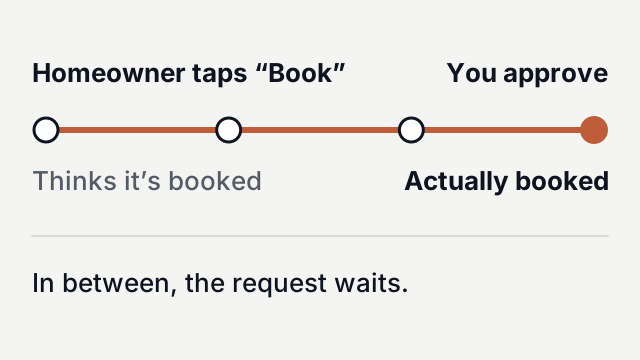
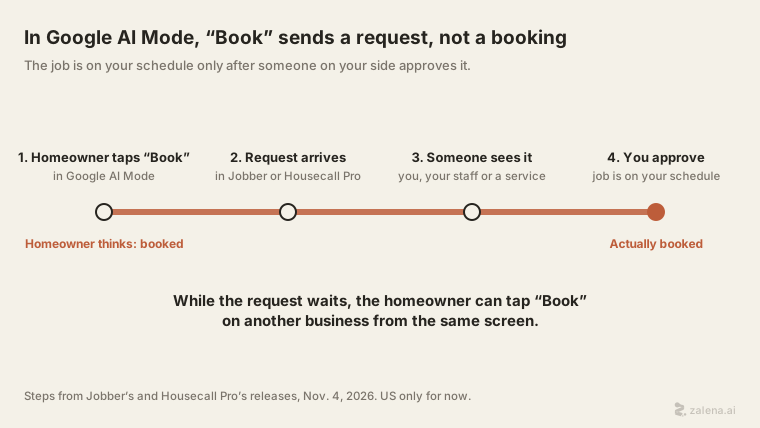
Google now shows home-service businesses in AI Mode with a “Book” button. When a homeowner taps it, nothing lands on your schedule. You get a request. The homeowner thinks they’re done, and the other businesses on that screen are one tap away.
This post covers what Google launched, why “Book” is only a request, and what to set up this week. The feature is US-only for now. Dollar figures here are US dollars. If you work in Canada or elsewhere, the last section is for you.
Terms used here
| Term | What it means |
|---|---|
| AI Mode | A Google Search tab where an AI writes the answer, instead of a list of links. |
| Field-service software | Apps like Jobber and Housecall Pro. Trades use them for quotes, schedules and invoices. |
| Booking request | A homeowner asks for a time slot. It is not a booking until you approve it. |
| Lead fee | What lead sites charge you for each customer enquiry. |
| Speed to lead | How fast you reply to a new enquiry. |
What did Google launch, and who can use it?
AI Mode now shows home-service businesses as cards. Robby Stein, VP of Product for Google Search, demoed a handyman search that returned four businesses, HomePros News reported. Each had a photo, a short review summary and links to call or book, get a quote, or visit its website. It is available only in the US for now, Search Engine Roundtable reported.
The buttons are run by other companies, not by Google:
| Button | Run by | What they say (12 Nov 2026) |
|---|---|---|
| Call or Book | Jobber | Available to eligible US customers |
| Call or Book | Housecall Pro | Its release says “coming soon” for eligible US customers |
| Call or Book | ServiceTitan | “Coming soon,” no date |
| Get a quote | Angi, Thumbtack | Shown in the demo; no terms published yet |
You can appear in AI Mode answers without these apps, HomePros reports. The Book button, though, runs through them.
Jobber’s release says requests arrive “without lead fees.” Housecall Pro’s release says pros can show real-time availability, verified reviews and service area. Housecall Pro says its users can appear “at no additional cost.” Google has said nothing about cost.
Most of this detail comes from the software companies, not Google. Google’s public word so far is Stein’s demo and a link to its general local-ranking tips.
If a customer taps “Book,” is the job booked?
No. Jobber says the business can “review and approve requests before they’re added to the schedule.” Housecall Pro sends them “straight to the selected Pro’s Housecall Pro Inbox.” Either way, a person on your side has to say yes.
That makes sense. You don’t want a stranger dropping a job into a Tuesday you’ve already filled. But the homeowner pressed a button labelled “Book.” In their head, the plumber is coming. Your clock started when they tapped.
A phone notification helps, but it is not a reply. If your phone buzzes while you’re under a sink, the request waits. If it buzzes ten more times that afternoon, it may wait until dinner.
How fast do you need to answer?
Nobody has published a response-time figure for this channel yet. We won’t make one up. What we know is the setup: the homeowner saw several businesses on one screen. If you don’t confirm, they can tap “Book” on the next one.
Housecall Pro’s co-founder and Chief AI Officer, Roland Ligtenberg, says the same in its release. “Speed wins in the trades,” he says. A homeowner asking Google for a plumber “hires whoever can come today.” His summary: “One request, one Pro, no lead fee, no bidding war.” Nobody bids on price. The race is about who replies first.
Lead sellers say it too. On Yelp’s Q3 2026 earnings call, CEO Jeremy Stoppelman said “Speed to lead is of critical importance to both sides of the transaction” (transcript). He was pitching Yelp’s own fast-reply feature. It is a sales point, not a study. It matches what both releases say, though. Treat an unanswered request like a missed call.
A worked example, with made-up numbers
Take a two-person plumbing company on Jobber. Say it gets 10 AI Mode requests a month, and the average job is worth $400.
- Scenario A. The owner checks the inbox at lunch and at 6 pm. A request waits about three hours. Assume they win 3 of 10.
- Scenario B. Someone replies to every request within 10 minutes in working hours. That could be a spouse, an answering service or an AI receptionist. Assume they win 6 of 10.
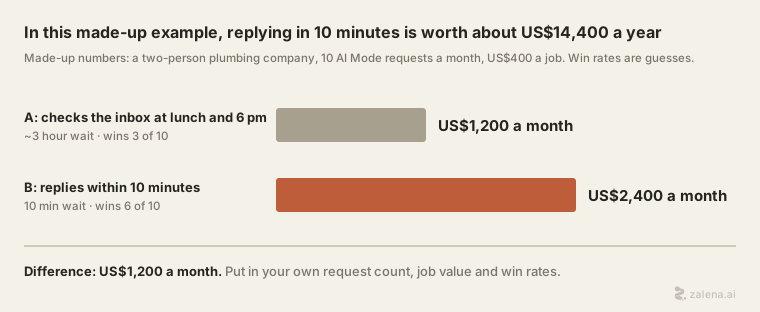
The win rates are our guesses, chosen to show how it works. They are not measured. Put in your own request count, job value and honest win rates.
Why might you not show up, even if you do good work?
Google hasn’t said how it ranks businesses here. Asked by HomePros, a spokesperson pointed to Google’s general tips for local ranking. That page says local results are “mainly based on relevance, distance, and popularity.” It is about local search in general, not AI Mode. Anyone who claims to know the exact AI Mode formula is guessing.
Ligtenberg made one more point that matters. Say a homeowner asks for “someone tomorrow,” and your calendar shows you as booked out. You’re “probably not going to show, even if it’s a better [contractor],” he told HomePros. It is “a booking request based on a time, independent of a price.”
Your calendar used to be for you and your crew. Now it may decide whether a homeowner sees you at all. Old placeholder jobs, or a week blocked “just in case,” could hide you on days you’d happily work.
What about the “Call” button: who picks up?
Some homeowners will skip “Book” and call. That runs into an older problem.
In June 2026, ServicePulse AI published a study of calls to contractors found on Google. An AI caller placed 1,077 calls in business hours, and 736 were classified. Half reached a real person.
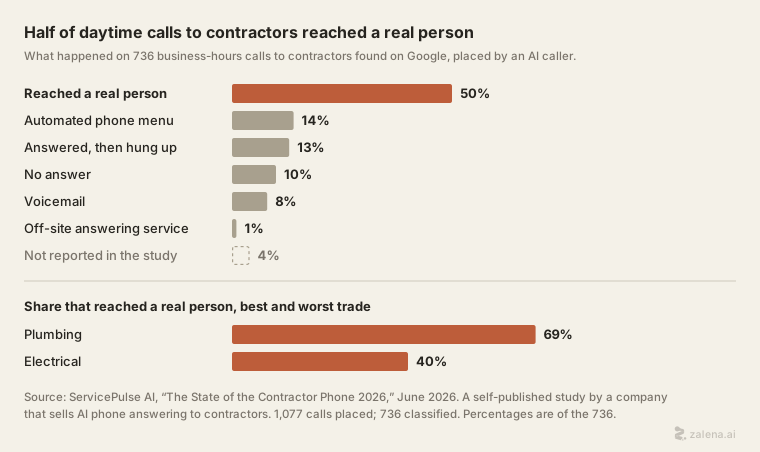
ServicePulse sells AI phone answering to contractors, as we do. It published the study itself and has not shared its data. Read it with that in mind. Still, if half of daytime calls to contractors don’t reach a person, a button that sends you more calls only helps if someone answers.
What should you set up this week?
- Make your calendar honest. Clear old placeholder jobs. Block only the time you really can’t work.
- Name one person for the request inbox. “Whoever sees it first” means nobody. Pick a person for each part of the day, and turn on push notifications.
- Set a reply target. Ours, not a statistic: reply to every request within 15 minutes in working hours. “Got it, we’ll confirm a time by 2 pm” is enough.
- Decide who answers while you’re on a ladder. A family member, an answering service or an AI receptionist that answers calls and messages and books into open slots. Decide before the first request, not after the third one goes cold.
- Match your details everywhere. Business name, phone number and service area should be the same on Google and in Jobber or Housecall Pro.
I’m in Canada or elsewhere. Does any of this apply?
Not yet. Both releases say eligible US customers, and neither gives a date for other countries. Jobber is a Canadian company, and it still launched this only for US customers.
The habit carries over, though. Your Google Business Profile calls and messages, your website form and Local Services Ads (where they’re offered) all work the same way. Each one is a customer waiting while your competitors are a tap away. Local Services Ads also charge you for each lead. Time your replies this month. If the answer is hours, fix it now.
If you’d like to hear an AI receptionist answer a call or a chat, you can try ours at zalena.ai.
Sources
- Deirdra Funcheon, “Google adds home services booking to AI Mode,” HomePros News, November 6, 2026.
- Jobber, “Jobber Integrates with AI Mode in Google Search, Opening a New Customer Acquisition Channel for Home and Commercial Service Businesses,” press release, PR Newswire, November 4, 2026.
- Housecall Pro, “Housecall Pro Integrates with AI Mode in Google Search to Turn Home Service Searches into Booked Jobs,” press release, GlobeNewswire, November 4, 2026.
- “Yelp (YELP) Q3 2026 Earnings Call Transcript,” The Motley Fool, November 6, 2026 (call held November 5).
- ServicePulse AI, “The State of the Contractor Phone 2026” (self-published study by a company that sells AI phone answering), June 2026.
- Barry Schwartz, “Google AI Mode Integrates With Home Services Booking,” Search Engine Roundtable, November 5, 2026.
- Google Business Profile Help, “Tips to improve your local ranking on Google.”